Features

macXterm: macOS SSH Client and Terminal Emulator for Network Engineers and Sysadmins

macXterm is a native macOS SSH client and terminal emulator with saved SSH sessions, AI terminal assistant workflows, syntax highlighting, jump hosts, and secure credential storage for production operations.

macOS SSH clientterminal emulatorsaved SSH sessionsAI terminal assistantsyntax highlightingnetwork engineers

Core Terminal Performance

A terminal engine built for real production shells

Native rendering with ANSI/VT100 behavior, long scrollback, and interactive app support.

Native ANSI/VT100 Emulator
A Swift-powered terminal engine designed for accurate output, fast updates, and stable long-running sessions.
Interactive TUI App Support
Run full-screen terminal tools like top, htop, vim, and nano without broken redraws or cursor drift.
Alternate Screen Buffer
Switch between command history and full-screen apps cleanly, without polluting normal scrollback.
50,000-Line Scrollback
Keep deep command history available per session for troubleshooting, audits, and replaying context.
Split and Grid Layouts
Use single, 2-column split, or 2x2 grid views to monitor multiple systems side by side.
Live Server Stats Footer
Track CPU load, memory, disk usage, and uptime in-session while you work.

Connections & Access

More than SSH in one workspace

Use multiple connection types without leaving the same tabbed workflow.

SSH and Local Shell Sessions
Run traditional SSH sessions and local shell tabs with the same keyboard-first workflow.
Telnet Connections (Pro)
Connect to legacy Telnet hosts from saved session profiles without leaving the same workspace.
Embedded Web Connections (Pro)
Open web-based admin interfaces inside macXterm using a built-in browser view.
SSH Jump Chains (Pro)
Route SSH through bastions or multi-hop chains with native per-session jump chain configuration.
Quick Connect + Saved Profiles
Jump into hosts quickly or maintain reusable connection profiles for routine operations.

Organization & Operations

Manage large fleets without UI sprawl

Structure sessions the way your infrastructure is organized and automate recurring actions.

Session Groups and Folders
Organize hosts into groups with icon and color metadata for faster scanning.
Folder and Server Group Notes
Save reference notes directly inside a folder or server group so operational details stay attached to the systems they describe.
Connection Templates (Pro)
Create reusable connection blueprints and spin up new sessions from templates in seconds.
Bulk Operations (Pro)
Apply group changes, tags, exports, or deletes across many saved sessions at once.
Command Tasks (Pro)
Define multi-step command sequences and run them across selected active connections.
Startup Scripts (Pro)
Attach one-command-per-line startup scripts to a saved session so the shell is primed right after login.
Dynamic Folders (Pro)
Auto-populate session lists from JSON, CSV, or API sources.
Export / Import Sessions
Back up and migrate session + group configurations with JSON import/export.

Security & Credentials

Vault-backed secrets and safer auth handling

Store credentials securely while keeping one-time access paths available when needed.

Master Password Vault
Unlock a protected credential vault to manage passwords and keys centrally.
Learn more
Private Key Management
Import and manage SSH private keys without leaving sensitive material in plain files.
Learn more
Standalone Credential Library
Store reusable host credentials separately from session definitions for safer reuse.
Session-Level Password Controls
Use session-scoped credentials and manual-entry flows when you do not want long-lived storage.
macOS-Native Secure Storage
Combine encrypted vault data with platform keychain capabilities for local secret handling.
Learn more

AI-Powered Productivity

Generate, explain, and repair commands faster

Built-in AI helpers reduce command friction without forcing you out of terminal flow.

AI Command Generation
Describe intent in natural language and generate shell commands with context from your active terminal output.
Explain Terminal Output
Highlight confusing output and get a concise, plain-language explanation immediately.
Repair Failed Commands
Provide a failed command and error message to receive targeted fix suggestions.
Provider Choice
Select from OpenAI, Groq, or Gemini providers for AI command workflows.
Real-Time Syntax Highlighting
Colorize shell syntax and patterns in terminal output to catch mistakes earlier.
Learn more

Pro Workflow Add-ons

Advanced tools for daily operations

Unlock operational tooling for high-volume, multi-host environments.

SFTP File Explorer (Pro)
Browse remote directories and upload/download files alongside terminal sessions.
Multi-Exec Commands (Pro)
Broadcast commands to all active tabs for synchronized cluster operations.
Cloud Sync (Pro)
Sync sessions, groups, and related data across devices via iCloud integration.
Session Recording (Pro)
Record and replay terminal sessions with export support for operational audits.
Custom Themes (Pro)
Adjust terminal color schemes and appearance settings for your team or personal setup.
Learn more
Priority Support (Pro)
Get faster support response handling on Pro subscriptions.

Product Screens

Screenshot-backed sections for the workflows people actually search for

Instead of listing features in the abstract, these cards show the actual macOS UI behind saved SSH sessions, AI assistance, vault security, and theme customization.

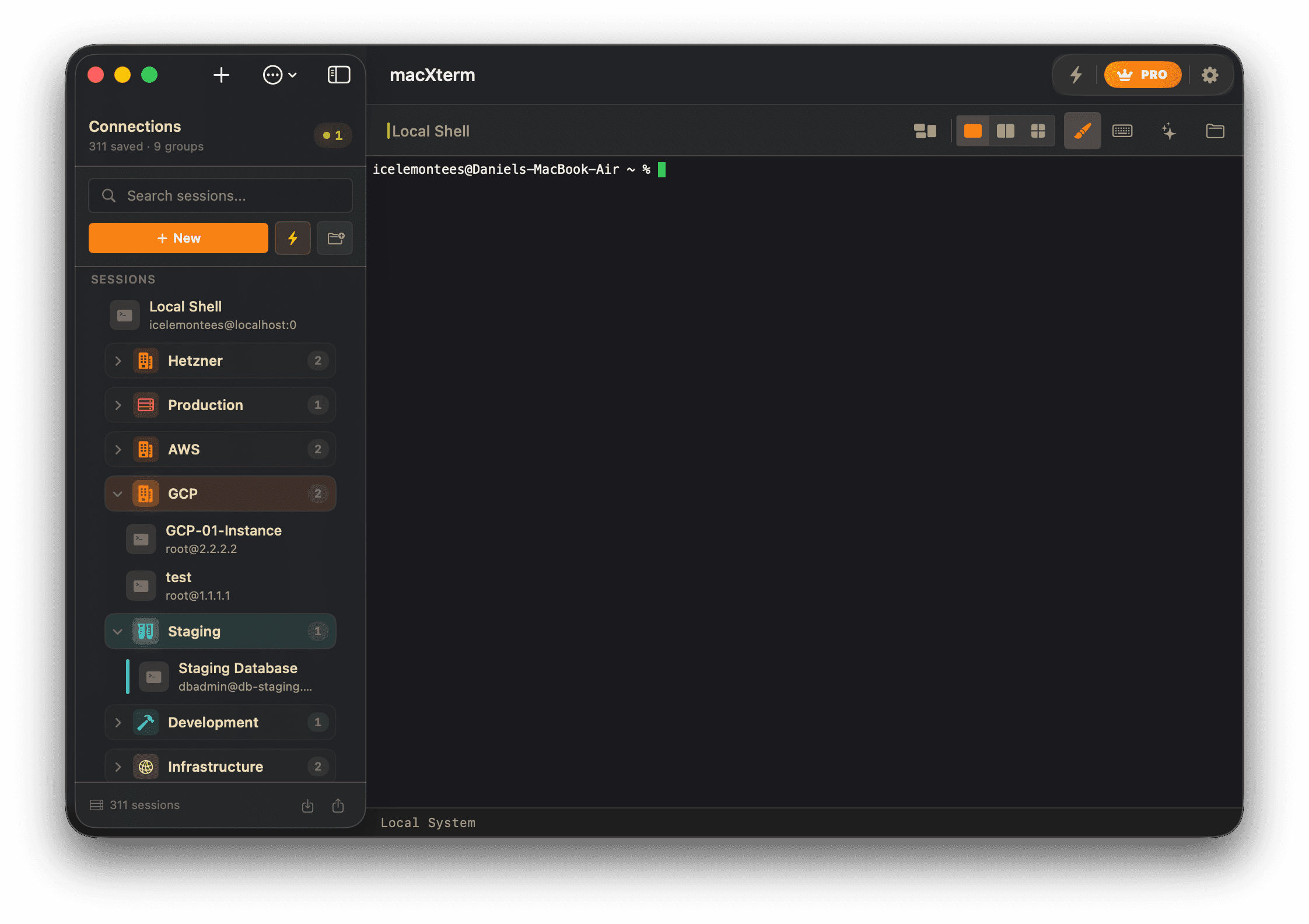
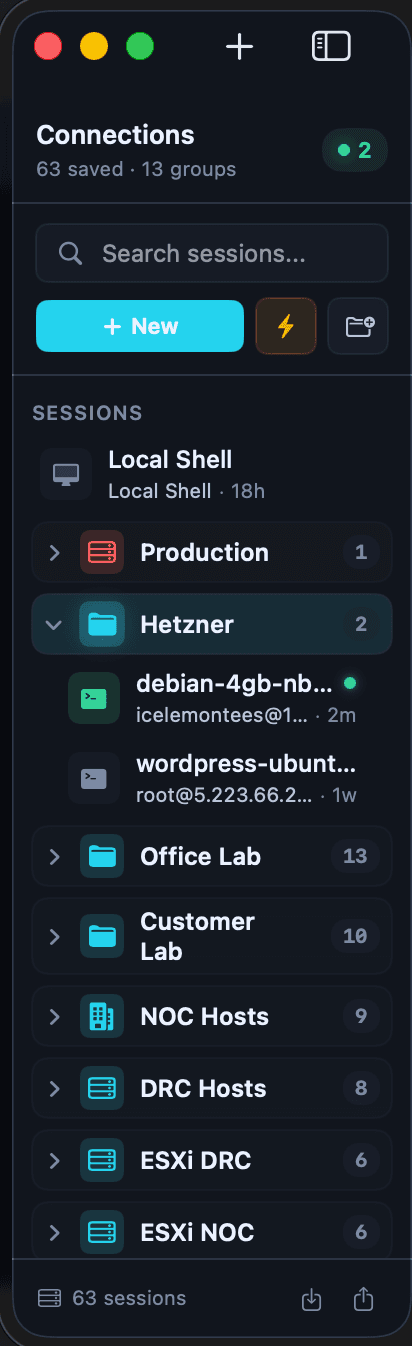
Saved SSH sessions and server folders in the macXterm macOS SSH client

Saved SSH Sessions

Organize SSH hosts with folders, notes, and fast reopen flows

Saved SSH sessions stay searchable and grouped, so network engineers and sysadmins can reopen the right servers without rebuilding context every time.

  • Group servers by environment, customer, or region
  • Keep saved SSH sessions ready for repeat operations
  • Reduce tab sprawl when you are managing large fleets
Compare plans
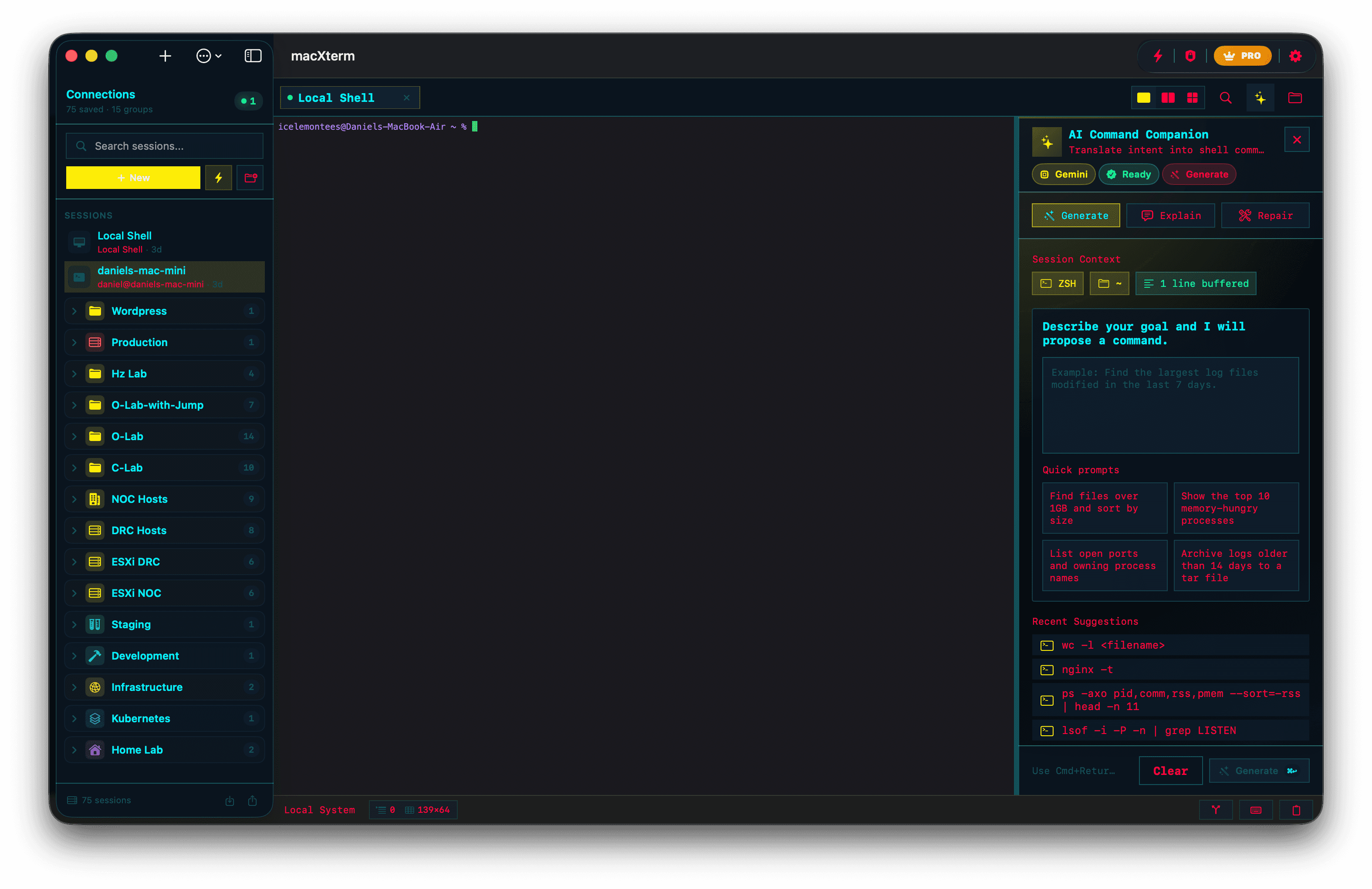
AI terminal assistant in macXterm for command generation and shell troubleshooting

AI Terminal Assistant

Generate commands, explain output, and repair failed shell commands

The built-in AI terminal assistant keeps command generation, troubleshooting, and explanation inside the same macOS terminal workspace.

  • Turn natural language into shell commands
  • Explain terminal output without copying it elsewhere
  • Repair failed commands from the active session context
Unlock Pro workflows
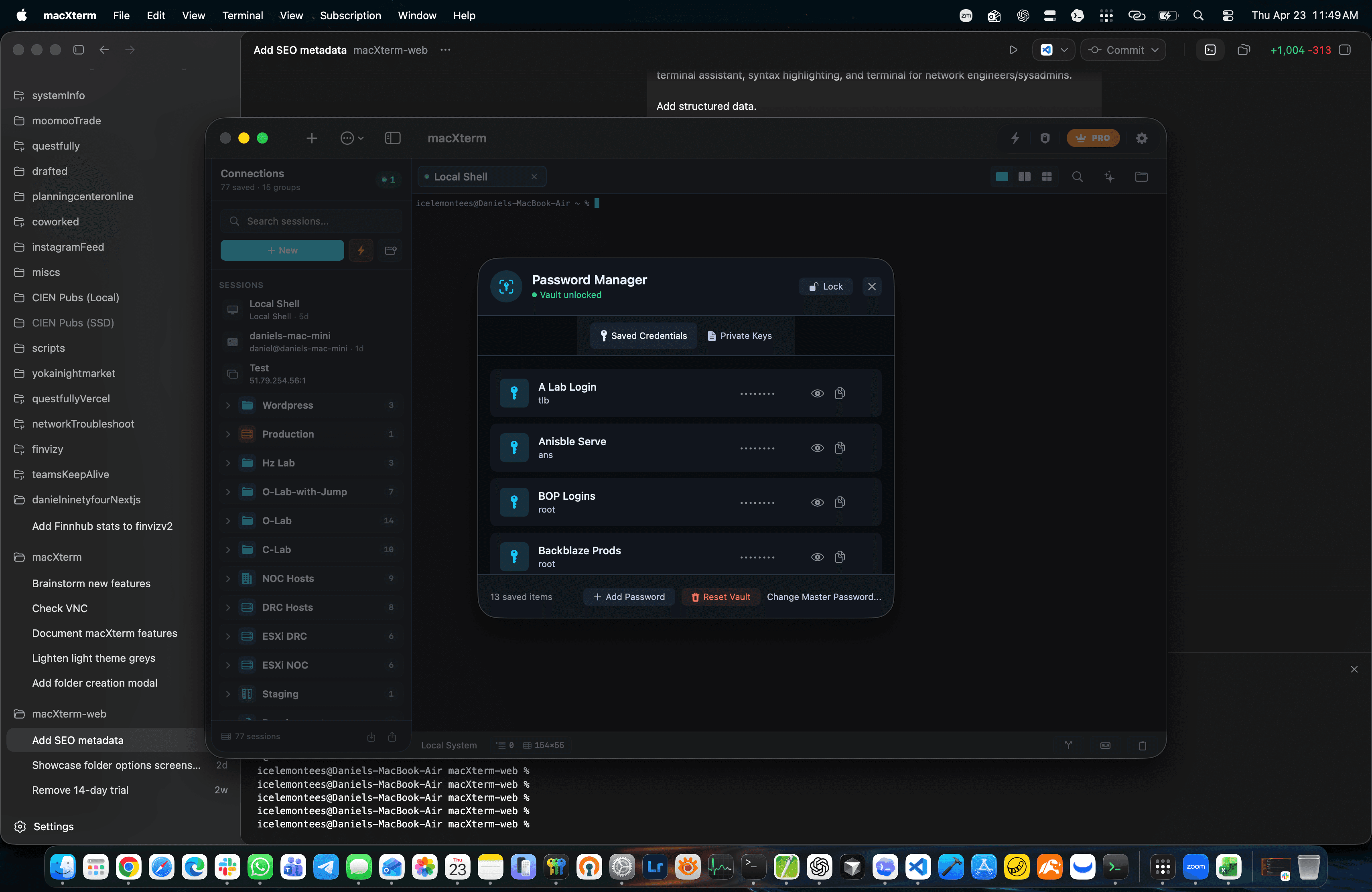
Unlocked credential vault in macXterm showing stored passwords and SSH private keys

Vault Security

Keep credentials behind a master-password-protected vault

macXterm stores passwords and private keys in a dedicated credential workflow with macOS-aware secure storage and clear unlock boundaries.

  • Manage passwords and SSH private keys in one place
  • Separate saved credentials from session definitions
  • Review the real implementation details on the security page
Read the security implementation
Dark custom terminal theme in macXterm on macOS

Themes and Readability

Tune terminal themes for calmer, clearer long-running macOS sessions

From dark themes to high-contrast palettes, macXterm gives teams stronger visual identity without losing readability during real terminal work.

  • Browse the theme gallery with real app screenshots
  • Pair themes with syntax highlighting for faster scanning
  • Keep shared operator setups visually consistent
Browse the theme gallery

Subscription Tiers

Free vs Pro

Start with the free macOS terminal, then unlock AI workflows, advanced connection tooling, and the full theme library when your setup grows.

View pricing
FeatureFree TierPro Tier
Unlimited Sessions
Up to 10UnlimitedPRO
Unlimited Tabs
Up to 5UnlimitedPRO
Session Groups
Up to 5UnlimitedPRO
Export/Import Sessions
✓ Included✓ IncludedPRO
Custom Themes
Modern onlyFull theme library
SFTP File Transfer
✓ IncludedPRO
Snippet Manager
✓ IncludedPRO
Multi-Exec Commands
✓ IncludedPRO
Cloud Sync
✓ IncludedPRO
Priority Support
✓ IncludedPRO
Unlimited Sessions
Free
Up to 10
Pro
Unlimited
Unlimited Tabs
Free
Up to 5
Pro
Unlimited
Session Groups
Free
Up to 5
Pro
Unlimited
Export/Import Sessions
Free
✓ Included
Pro
✓ Included
Custom Themes
Free
Modern only
Pro
Full theme library
SFTP File Transfer
Free
Pro
✓ Included
Snippet Manager
Free
Pro
✓ Included
Multi-Exec Commands
Free
Pro
✓ Included
Cloud Sync
Free
Pro
✓ Included
Priority Support
Free
Pro
✓ Included

FAQ

Common questions about macXterm on macOS

These answers mirror the long-tail questions buyers ask before downloading a macOS SSH client or terminal emulator.

Does macXterm support SSH jump hosts on macOS?

Yes. macXterm supports SSH jump chains so you can route a session through bastions or multi-hop access paths from saved macOS connection profiles.

Can I save sessions and folders?

Yes. You can save SSH sessions, organize them into folders and groups, add notes, and export or import your saved session library as JSON.

Does macXterm have AI command generation?

Yes. The built-in AI terminal assistant can generate commands from natural language, explain terminal output, and suggest repairs for failed shell commands.

How does credential storage work?

macXterm uses a master-password-protected vault, encrypted local storage, and macOS keychain-aware handling for credentials and SSH private keys. You can also keep access session-scoped when needed.

Does macXterm include syntax highlighting?

Yes. macXterm can highlight shell commands, paths, URLs, IPs, and log signals in real time so operators can scan terminal output faster.